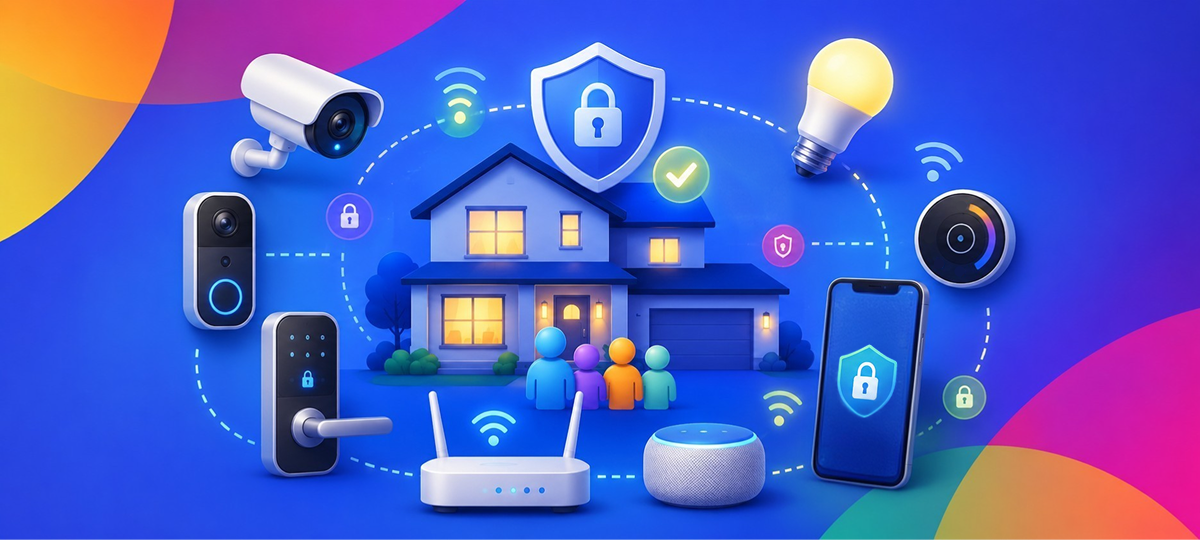
Smart home devices make life easier—lights that turn on with your voice, doorbells that let you see visitors from anywhere, thermostats that learn your schedule. But every device you connect to your home network is also a potential entry point for security problems. The good news? You don’t need to be a tech expert to make your smart home safer.
Understanding Smart Home Devices
Smart devices are any gadgets in your home that connect to the internet. Common examples include:
- Smart speakers (Alexa, Google Home)
- Video doorbells and security cameras
- Smart TVs
- Wi-Fi-enabled thermostats
- Connected light bulbs and switches
- Smart locks
- Robot vacuums
- Smart refrigerators, ovens, and other appliances
Each of these devices talks to the internet to work properly—whether it’s to stream music, send you alerts, or let you control them from your phone. This connection is what makes them “smart,” but it’s also what requires you to think about security.
Why Smart Device Security Matters
Your Devices Could Be Spying on You
Many smart devices have cameras and microphones. If not properly secured, hackers could potentially access these to see or hear what’s happening in your home. Even without malicious intent, some companies have been caught having employees listen to voice recordings to “improve the product”.
Weak Links in Your Network
Think of your home network like a chain—it’s only as strong as its weakest link. A poorly secured smart bulb might seem harmless, but hackers can use it as a stepping stone to access more sensitive devices like your computer or phone.
Privacy Concerns
Smart devices collect a lot of data about your daily routines, habits, and preferences. While companies claim this improves their services, this information is valuable and could be shared, sold, or accidentally leaked.
Botnet Attacks
Hackers can take over poorly secured smart devices and use them to attack other systems on the internet, often without you even knowing. Your innocent doorbell camera could become part of a massive digital attack force.
Common Smart Home Security Mistakes
1. Using Default Passwords
Most devices come with simple default passwords like “admin” or “12345.” Many people never change them, making it easy for anyone to access the device.
2. Skipping Updates
Just like your phone and computer, smart devices need regular updates to fix security problems. But unlike phones, these devices don’t always make it obvious when updates are available.
3. Connecting Everything to Your Main Network
Having your smart fridge on the same network as your work computer means if someone hacks the fridge, they might be able to reach your computer too.
4. Buying Unknown Brands Without Research
Some cheap smart devices have terrible security because the manufacturer cut corners. That budget smart plug might save you $5 but cost you much more in security risks.
5. Not Reading Privacy Policies
We all skip them, but privacy policies tell you what data your device collects and what the company does with it. Sometimes the answer is surprising and concerning.
Making Your Smart Home More Secure
Step 1: Know What You Have
Make a list of every smart device in your home. Include:
- What it is
- What brand/model
- When you bought it
- Where it’s located
You’d be surprised how easy it is to forget about that smart plug you installed years ago.
Step 2: Change All Default Passwords
Go through each device and change its password to something unique and strong. Use a password manager if keeping track seems overwhelming—apps like 1Password or Bitwarden can securely store all your passwords.
Step 3: Set Up a Guest Network for Smart Devices
Most modern routers let you create a separate Wi-Fi network. Put your smart devices on this “guest” network and keep your computers and phones on your main network. This way, if a smart device gets hacked, the hacker can’t easily access your personal devices.
Here’s how:
- Log into your router settings (usually at 192.168.1.1)
- Look for “Guest Network” or “Network Settings”
- Enable the guest network and give it a different name
- Reconnect your smart devices to this new network
Step 4: Keep Everything Updated
Check for updates monthly:
- Open each device’s app on your phone
- Look for “Settings” or “About”
- Check for firmware/software updates
- Enable automatic updates if the option is available
Set a reminder on your phone to do this on the first day of each month.
Step 5: Disable Features You Don’t Use
Many smart devices have features you’ll never use. Turn them off to reduce risk:
- Remote access (unless you specifically need to control the device from outside your home)
- Voice purchasing on smart speakers
- Microphone when not needed
- Camera when you’re home
Step 6: Research Before Buying
Before purchasing new smart devices:
- Read reviews that mention security and privacy
- Choose established brands with good track records
- Check if the company provides regular updates
- Avoid devices that require creating an account with excessive personal information
Specific Device Security Tips
Smart Speakers and Displays
- Mute the microphone when having private conversations
- Regularly delete voice recordings (Amazon and Google let you do this)
- Don’t store payment information for voice shopping
- Place them away from windows where conversations could be heard
Security Cameras and Video Doorbells
- Change default passwords immediately
- Enable two-factor authentication if available
- Position cameras to avoid capturing neighbors’ property
- Use local storage when possible instead of cloud storage
- Cover indoor cameras when you’re home if it makes you more comfortable
Smart TVs
- Turn off automatic content recognition (ACR) which tracks what you watch
- Don’t use the TV’s built-in camera for video calls
- Review and limit data collection settings
- Use a streaming device instead of built-in TV apps (they’re often more secure)
Smart Locks
- Keep physical keys as backup
- Check battery levels regularly
- Review access logs to see who’s coming and going
- Use unique access codes for different people
- Remove codes for people who no longer need access
Teaching Everyone in Your Household
Make sure everyone who lives with you understands basic smart device safety:
- Don’t share Wi-Fi passwords with visitors (use the guest network)
- Be careful what you say around smart speakers
- Don’t click links in emails claiming to be from device manufacturers
- Report anything unusual immediately
Using Monitoring Tools
GlassWire shows you all the devices connected to your network and what they’re doing. You’ll see if your smart fridge is sending more data than expected or if an unknown device has connected to your network. The visual interface makes it easy to spot problems without technical knowledge.
Signs Your Smart Device Might Be Compromise
Watch for these warning signs:
- Device acting strangely or doing things you didn’t command
- Unfamiliar devices appearing in your device list
- Unusual amounts of data being sent/received
- Can’t log in with your normal password
- Device is much slower than usual
- Strange noises from speakers when not in use
- Cameras moving on their own
When to Replace a Device
Sometimes it’s safer to replace a device than try to secure it:
- The manufacturer no longer provides updates
- The device is more than 5 years old
- You’ve discovered it has unfixable security flaws
- It’s from an unknown brand with no support
Conclusion
Smart home devices should make your life easier, not put your privacy and security at risk. By taking these straightforward steps, you can enjoy the convenience of a connected home while keeping your family safe. Remember, security isn’t a one-time setup—it’s an ongoing practice of staying aware and keeping things updated.
Start today by making a list of your smart devices and checking for available updates. Small actions now prevent big problems later. Your smart home can be both convenient and secure—it just takes a bit of regular attention.